The Basic Information tab allows you to specify basic company information and how users sign in to the dotCMS back end. To access the Basic Information tab, select System -> Configuration from the back-end navigation panel and select the Basic Information tab.
There are three sections of the Basic Information tab, and the information in each section can be modified and saved separately.
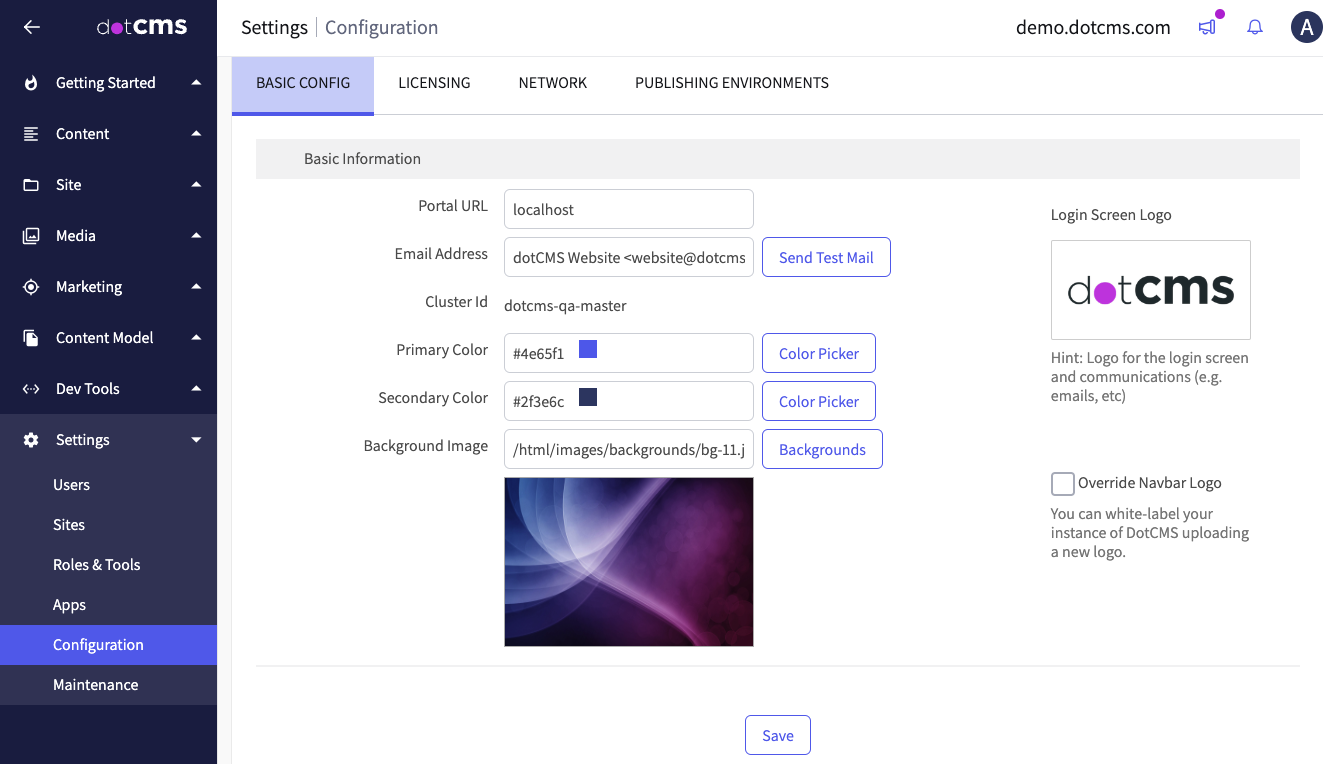
| Field | Description |
| Portal URL | Local reference URL on dotCMS server; default = localhost |
| Mail Domain | The main domain of the server. |
| Email Address | The email address that will be used on all emails sent from the dotCMS portal (including registration emails, emails used to recover a user password, etc). |
| Cluster ID | The identifier of the server cluster to which this instance belongs. (One will be assigned randomly if no cluster exists.) |
| Primary Color | The default primary color for the dotCMS back end. |
| Secondary Color | The default secondary color for the dotCMS back end. |
| Background Image | The default background image for the dotCMS back end (displayed on the login page). |
Locale
| Field | Description |
| Language | Changing this language translates the back-end UI to the given language by default.- Individual back-end users may still choose to translate the back-end interface into a different available language.
- The current available back-end languages are: English, Chinese (Simplified), Dutch, Finnish, French, German, Italian, Russian and Spanish.
- If you would like to provide a translation of the dotCMS back end to a new language, please contact us.
|
| Time Zone | The server time zone.- Times for all back-end users will be displayed using this time zone setting (regardless of the users' local time zone).
|
Security
| Field | Description |
| Authentication Type | Specifies what types of IDs users use to sign in to the dotCMS back end: Email Address or UserId. |
| SHA-3 Key Digest | Allows viewing or regeneration of the Secure Hash Algorithm key for the instance. This affects how system secrets are stored; regenerating this key will invalidate all existing App integration secrets. |